
Table of Contents
Introduction
Managing databases is a crucial aspect of web development and server management. For those using Plesk, accessing phpMyAdmin—a powerful web-based database management tool—can simplify many database tasks, such as running SQL queries, importing/exporting data, and managing database tables. Plesk, a popular web hosting control panel, provides seamless integration with phpMyAdmin, allowing users to easily access and manage their MySQL databases. In this guide, we will walk you through the step-by-step process of accessing phpMyAdmin in Plesk, ensuring you can efficiently manage your databases with ease.Let’s see the steps for How to Access phpMyAdmin in Plesk
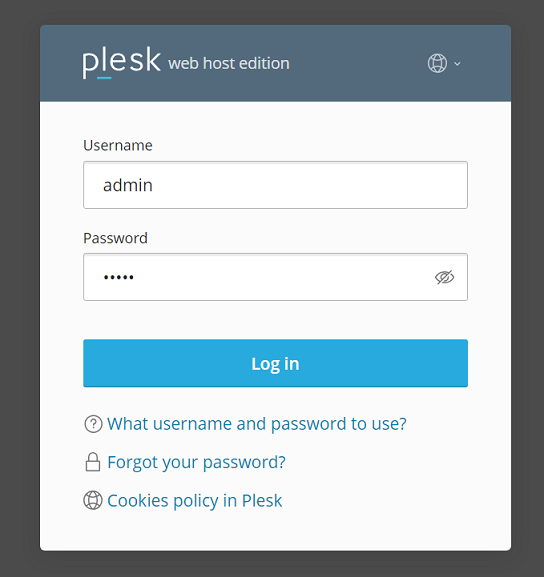
Step 1: Log into Plesk
- Open your web browser and navigate to the Plesk login page.
- Enter your username and password, then click “Log In.”
Step 2: Access Databases Section
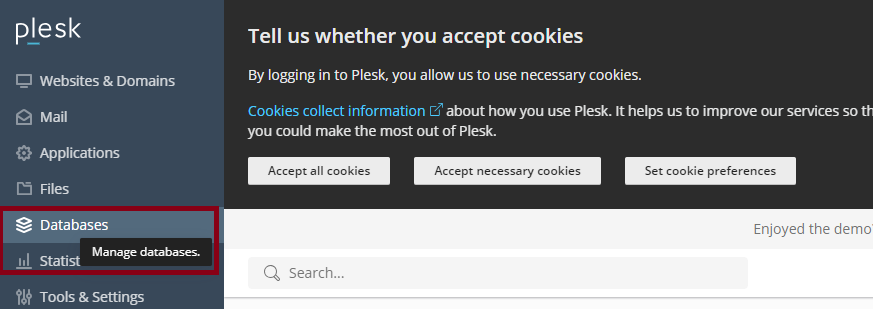
- Once logged in, you will be on the Plesk dashboard.
- In the left sidebar, click on “Databases”
Step 3: Open phpMyAdmin
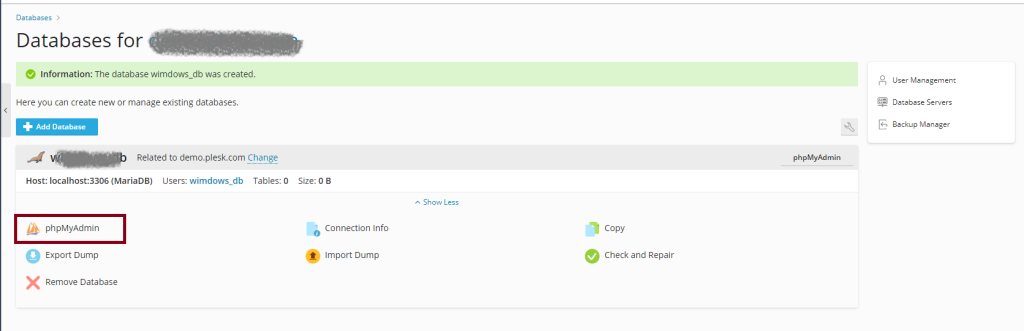
- On the databases management page, you will see a list of databases associated with your domain.
- Find the database you want to manage.
- Next to the database name, you should see a “phpMyAdmin” icon or a link that says “phpMyAdmin.”
- Click on the “phpMyAdmin” icon or link.
Step 4: Use phpMyAdmin
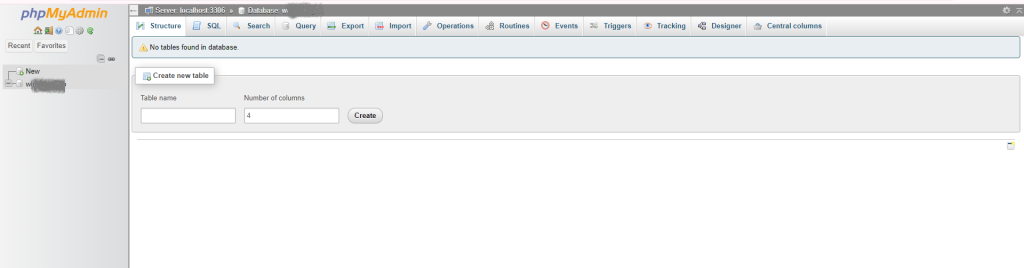
- A new tab or window will open, taking you to phpMyAdmin.
- You can now manage your MySQL databases, run SQL queries, import/export data, and perform other database-related tasks.
Troubleshooting Tips
- If you don’t see the phpMyAdmin link, ensure that you have the necessary permissions to access the database and phpMyAdmin.
- Make sure that your browser is not blocking pop-ups, as phpMyAdmin may open in a new tab or window.
- If phpMyAdmin does not load, verify that the Plesk server and related services (MySQL/MariaDB) are running properly.
By following these steps, you should be able to easily access and manage your databases using phpMyAdmin in Plesk.
Conclusion
Accessing phpMyAdmin in Plesk is a straightforward process that can significantly enhance your ability to manage MySQL databases. By following the outlined steps, you can quickly navigate to phpMyAdmin from the Plesk dashboard and take full advantage of its powerful database management features. Whether you need to run complex SQL queries, back up your data, or perform routine maintenance tasks, phpMyAdmin provides a user-friendly interface to handle all your database needs. With Plesk’s seamless integration, managing your databases becomes a hassle-free experience, empowering you to maintain the efficiency and security of your web applications.